Real-time ROV video overlay & telemetry studio.
Live multi-camera video, a drag-and-drop telemetry overlay designer, and broadcast-quality recording — in one Windows app. Every frame you record is exactly what the pilot sees on screen.
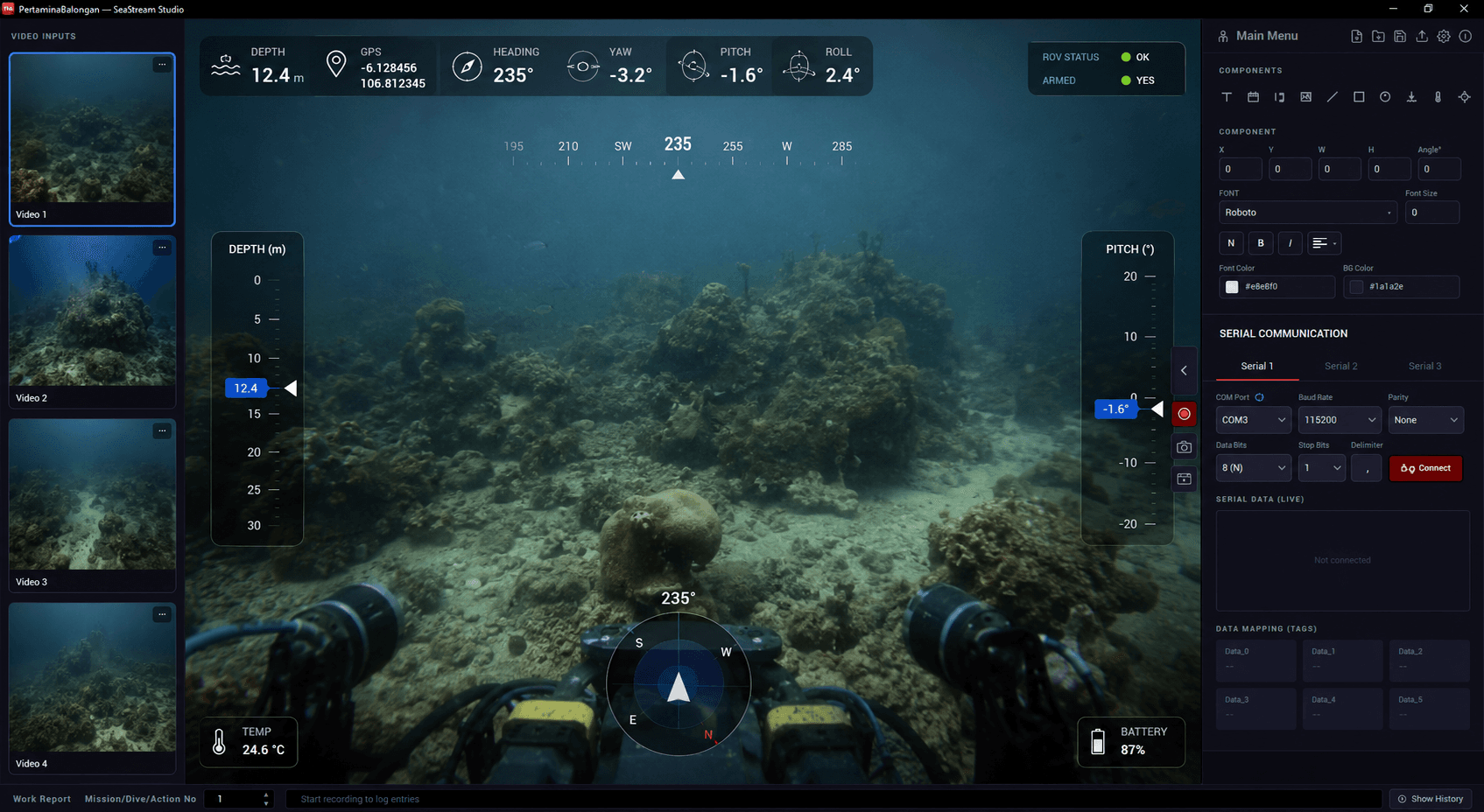
Everything in one tool
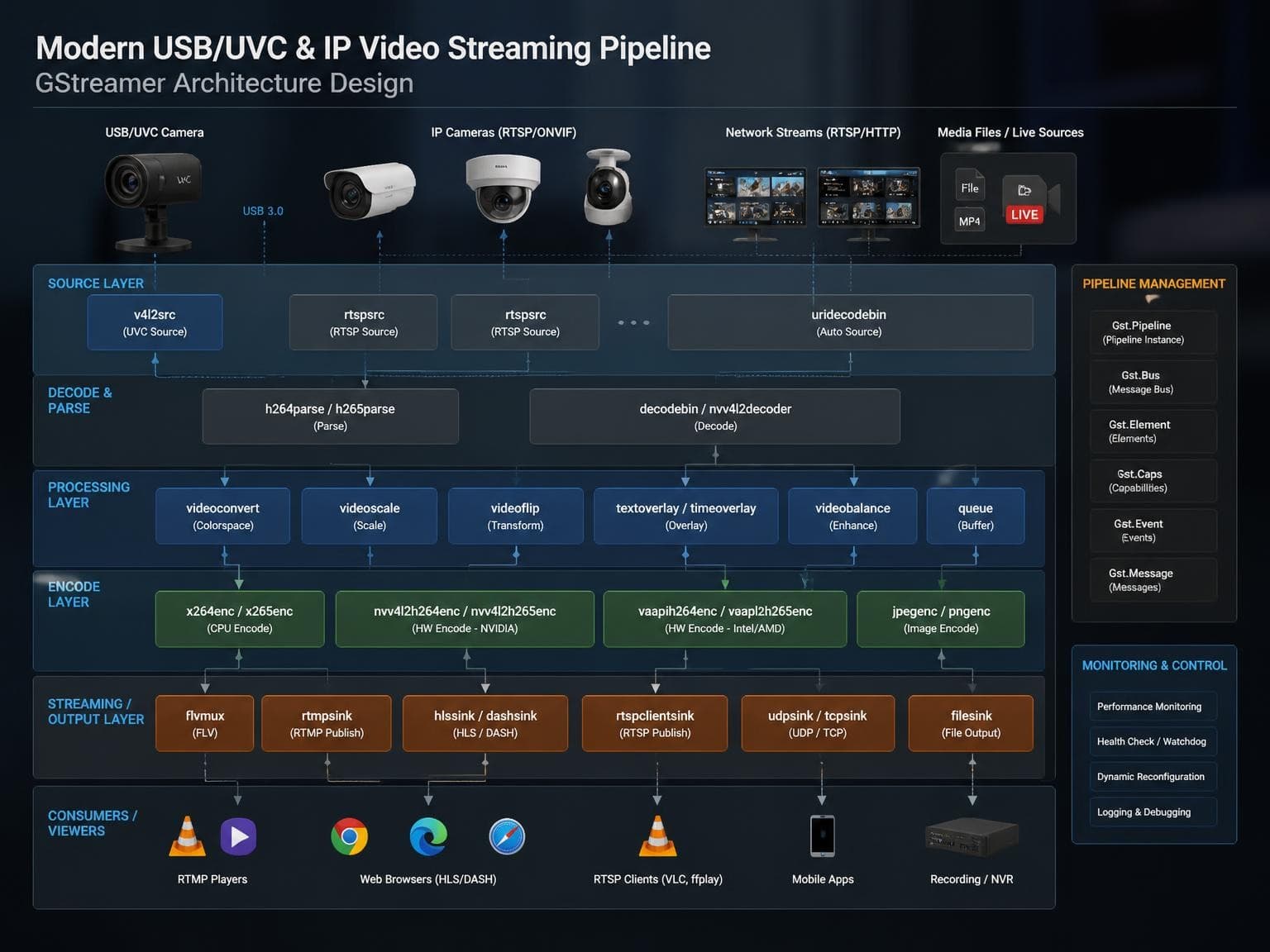
Built on Qt 6 and a GStreamer pipeline, engineered for the two things live piloting needs: low latency and reliability.
Multi-camera input
Up to 4 simultaneous sources — USB/UVC cameras and RTSP/IP streams, mixed.
Live overlay designer
13 draggable widget types, freely positioned on the video canvas.
Broadcast recording
MP4 & MKV, GPU-accelerated H.264, with the overlay burned in.
Live telemetry
Serial sensor ingestion with tag parsing and instant on-screen binding.
Data logging
QuestDB time-series export, CSV recording, and work-report archives.
Portable deployment
Runs on any Windows 10/11 PC — no installer to chase.
Overlay Designer
Build the mission HUD, your way
A free-form canvas where operators drag telemetry widgets — compass, depth, heading, tag values, crosshair, logos, and more — anywhere over the live video.
- 13 widget types, freely positioned and styled
- Live data binding — widgets update in real time from sensors
- What you see is what you record — composited pixel-for-pixel
- One-click full-screen output for live monitoring
Video Engine
Four cameras, near-zero latency
A latency-tuned network pipeline eliminates the multi-second buffering typical of generic players — critical for live ROV piloting.
- Up to 4 independent inputs — USB/UVC or RTSP/IP, mixed
- Near-zero-latency RTSP tuned for real-time response
- Automatic H.264, H.265/HEVC, and MJPEG decoding
- One-click promotion of any input to the main canvas
Technical Specifications
Engineered for the control room
SeaStream Studio 1.0.0 — a frameless dark interface designed for low-light control rooms and long dive shifts.
System requirements
Windows 10 / 11 (64-bit), portable — no install.
Any UVC USB and/or RTSP-capable IP camera.
GPU with hardware H.264 recommended; software fallback works on minimal specs.
Have questions? We have answers.
The things operators ask most about licensing, trials, and running SeaStream Studio in the field.
Can I try SeaStream Studio before buying?
Yes. Evaluation mode installs and runs the full application — recordings and snapshots simply carry an on-screen watermark on the video output until the device is licensed.
How does licensing work?
Licenses are lifetime and per device. Activation is tied to a unique per-machine Device ID, so one license permanently activates one Windows machine — no subscriptions, no recurring fees.
What are the minimum system requirements?
It runs on minimum-spec Windows 10 or 11 (64-bit). Because a software (x264) encoder fallback is built in, recording works even without a dedicated GPU — a GPU with hardware H.264 (Intel Quick Sync or NVIDIA NVENC) is only recommended for the lowest CPU load.
Do I need to install anything?
No. SeaStream Studio is portable — the GStreamer runtime ships alongside the app, with no installer and no external dependencies to configure.
What cameras and inputs are supported?
Up to four simultaneous sources — UVC USB cameras and RTSP/IP network streams, mixed per grid — with automatic H.264, H.265/HEVC, and MJPEG decoding.
Ready to put SeaStream Studio on your next dive? Request a demo or a licensing quote.
Request a Demo